
Skycrown Registration
Skycrown registration takes 2 to 3 minutes and creates your account on sky-crown.top. We allow one account per person, so use your existing profile if you have already joined. Players in Australia can prepare their contact details before starting, then complete our form, confirm their email or phone, and sign in.
Before You Begin Skycrown Registration
Prepare for Skycrown registration with a device, a working email address or mobile number, and accurate personal details. Players in Australia must be at least 18. Use information that matches your documents rather than a nickname or borrowed details. Choose contact information you control, because we send confirmation there. Keep everything ready before opening our form so there is no need to interrupt your application.
Once signed in, your profile provides access to games, deposits, withdrawals and support. Treat gambling as paid entertainment within a budget, not a way to cover everyday expenses. Before completing Skycrown registration, decide what spending fits comfortably alongside other commitments. For players in Australia, choosing Australian dollars also keeps balances in a familiar currency. Take time to understand each activity before putting money towards play.
How to Complete Skycrown Registration
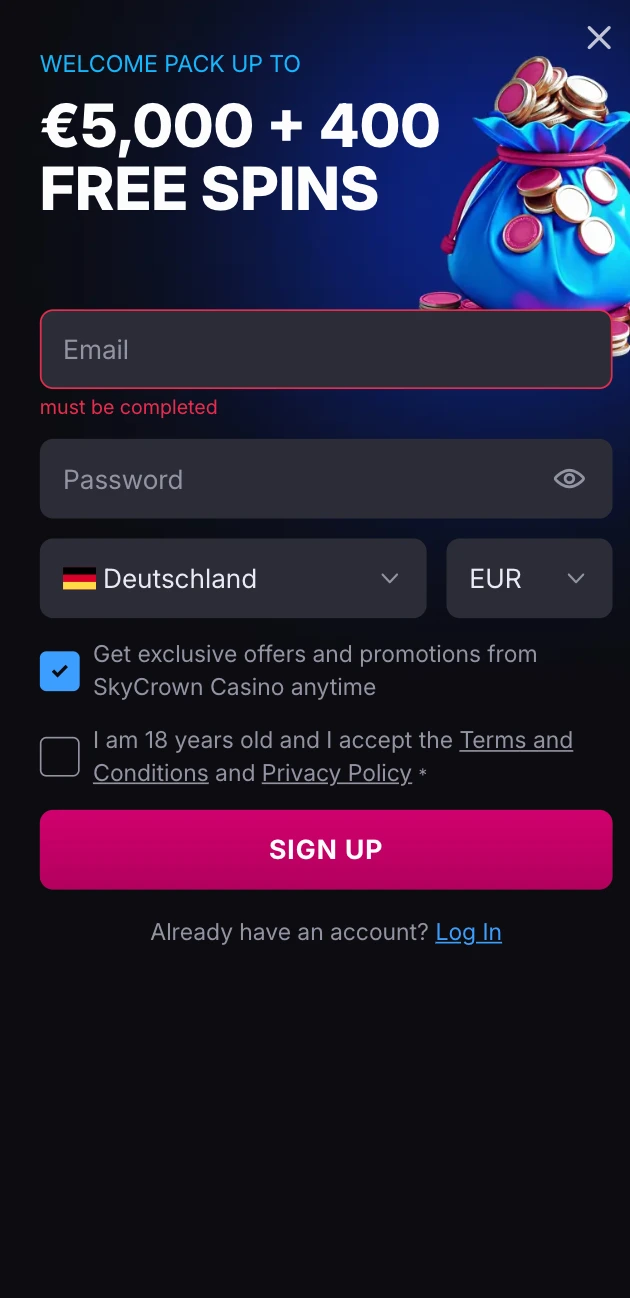
Begin Skycrown registration by entering our address directly rather than following an unfamiliar message. Have your chosen contact method ready to receive confirmation. Read each field carefully, especially choices that affect how balances are displayed. The sequence below takes you from opening our website through submitting details and accessing your new profile.
- Type sky-crown.top into your browser.
- Press the registration control to open our form.
- Enter an email address or phone number and create a password.
- Choose AUD as your currency and Australia as your country.
- Confirm your age and acceptance of our terms.
- Enter the confirmation code or follow the link sent to your chosen contact, then sign in.
Check your browser’s address before submitting anything. Fake copies exist, so similar colours or familiar wording are not enough to identify our website. Skycrown registration belongs on the exact domain shown above. Stop if an address differs, and return by typing it yourself rather than continuing through an unexpected link.
Data You Provide
Our opening form collects contact, access and location details. Personal identity information comes later, when we verify your profile. Each entry serves a separate purpose, from delivering confirmation through establishing eligibility. For phone entries in Australia, use the international mobile format, such as +61 4xx xxx xxx, with your own number replacing the example.
| Data | When We Ask | Requirement |
|---|---|---|
| Email or phone | Sign up | 6-digit code; valid for 15 minutes |
| Password | Sign up | At least 8 characters; 1 letter and 1 number |
| Currency | Sign up | 1 currency per account; AUD |
| Country | Sign up | 1 country per account |
| Name and date of birth | Verification | Real details; adult eligibility |
| Address | Verification | Proof no older than 3 months |
Your selected currency cannot be changed later. If submitted details differ from supporting records, those differences need resolving before identity checks can finish. Compare spelling, birth details and residential information carefully. Entering accurate information from the beginning avoids creating inconsistencies that must be addressed during review.
Identity Checks After Skycrown Registration
Identity checks connect your profile with a real person. After Skycrown registration, we require ID verification within 72 hours of opening. This is separate from confirming access to an email inbox or mobile phone. Supplying genuine details from the outset gives us consistent information to review and helps establish that the person registering matches their records.
Prepare a valid, unexpired photo ID. Players in Australia can use their passport or driving licence as familiar identity documents. When preparing photographs, keep information readable and avoid cutting off edges. Clear images support Skycrown registration checks by letting us compare identifying details without obscured text or missing portions.
Verification is required once, before your first withdrawal. Our review takes from a few hours to 3 business days. Keep that review period in mind before planning access to withdrawn funds. Completing identity checks belongs alongside the opening process, rather than being left until money is needed for an expense.
Steps After Registration
After Skycrown registration, work through your profile before moving into paid play. Confirming details first gives you a clear starting point. Keep spending decisions separate from the excitement of opening something new. Players in Australia should use the same careful approach whether browsing games or preparing their first deposit.
- Sign in and review your details. Compare saved information with your records. Address errors before continuing.
- Consider our welcome offer. Once you have completed all the steps, you can take our welcome bonus: First Deposit Bonus 120% up to A$810 + 125 Free Spins. Full conditions are in the bonus section of sky-crown.top.
- Deposit within your budget. Choose an amount reserved for entertainment. Leave money needed for bills and other commitments untouched.
- Explore a few games. Read their rules before starting. Following Skycrown registration, a small selection provides a manageable introduction without rushing between unfamiliar titles.
- Set personal boundaries. Decide your time and money limits before playing. Visit our responsible gaming page for further information.
Gambling is entertainment, never income. Losses are not a reason to spend more, and stopping remains a valid choice at any point. For support in Australia, Gambling Help Online provides a place to seek help with gambling concerns. Keep personal wellbeing ahead of continued play.
Keeping Skycrown Registration Secure
Protecting access starts during Skycrown registration and continues whenever you return. Contact details, sign-in credentials and confirmation messages deserve careful handling. Keep private information separate from conversations about games or results. Simple habits reduce opportunities for someone else to use information intended only for you.
- Choose a strong, unique password that is not used elsewhere.
- Never share confirmation codes with another person.
- Sign out after using a shared device.
- Type sky-crown.top yourself when returning.
- Keep contact details current so messages reach you.
We never ask for your password by message. Treat any such request as a reason to stop responding, regardless of how convincing its wording looks. Private credentials should stay private throughout your time with us, including when discussing an access problem or requesting assistance.
Troubleshooting Skycrown Registration
If Skycrown registration stops, review the information entered before trying again. A mistyped contact, undelivered code or weak password can prevent completion. Incorrect country or currency selections also require attention. Age restrictions and duplicate profiles are separate barriers, not problems solved by changing personal details. Compare entries carefully rather than submitting repeated attempts with different information.
Start by correcting visible typing errors and checking your chosen inbox or phone for our message. Note the point where progress stopped. For unresolved Skycrown registration problems, write to support@sky-crown.top with the step, what appeared onscreen, your device and browser. Describe any error wording accurately so we can understand what happened. Never send a password with your request or include it in an image.